
Rated 5.0 on the App Store

Scrap the script.
Record videos naturally.

MakiRoll helps you record videos by answering questions, then saves you hours of editing.

Download on the App Store

3 videos free · No card required

0:00 / 0:00

Loved By Users All Over The World

Here's what they say.

Thomas KanzeAntonis EvmorfopoulosIzzie CheaM AnderssonMartin TaleEd RichardsClim Stefan
Creators using MakiRoll
M Andersson

M Andersson

Early User

“I’ve been using Makiroll for the last week or so. Before that i had an extremely hard time talking in vlog-format, especially in English. Makiroll suggests what to talk about, then spins further on what you just said. You never sit there with nothing. That killed the hurdle of even getting the thought to make a vlog. Thanks Makiroll”
Ed Richards

Ed Richards

Early User

“I struggle with recording myself talking. Even when I got more comfortable with it, I was told I was boring and monotone, which made me stop. When I saw MakiRoll, I knew I had to try it because it could help me get back to recording my thoughts.”
Martin Tale

Martin Tale

Early User

“I’m super shy and this really helped me start making videos and I’m getting more comfortable doing that every day 💪”
★★★★★Martin Tale ↗
Izzie Chea

Izzie Chea

Early User

“Tapping thru and using this app to help with recording takes and compiling clips into a solid piece of talking head content has been fun! Also, the developer is very very good and responsive and open to feedback. Looking forward to using this more and more. Keep it up! Download it today and you won’t be disappointed. 🌟”
★★★★★Izzie Chea ↗

Two Ways To Record A Video

One is easier to repeat.

Without MakiRoll

  1. 1Get an idea.
  2. 2Record 7 awkward takes.
  3. 3Give up and write a script.
  4. 4Try to memorize the script.
  5. 5Stumble anyway.
  6. 6Finally nail a take.
  7. 7Realize it doesn't sound like you.
  8. 8Never post it.

With MakiRoll

  1. 1Bring a rough idea. It doesn't need to be ready yet.
  2. 2Remove the mirror. See questions instead of yourself.
  3. 3No scripts. Just talk. Stumble, think and pause all you want.
  4. 4Get your video. Maki finds the story and cuts it together.

A Camera That Talks Back

Share-ready videos in 4 steps.

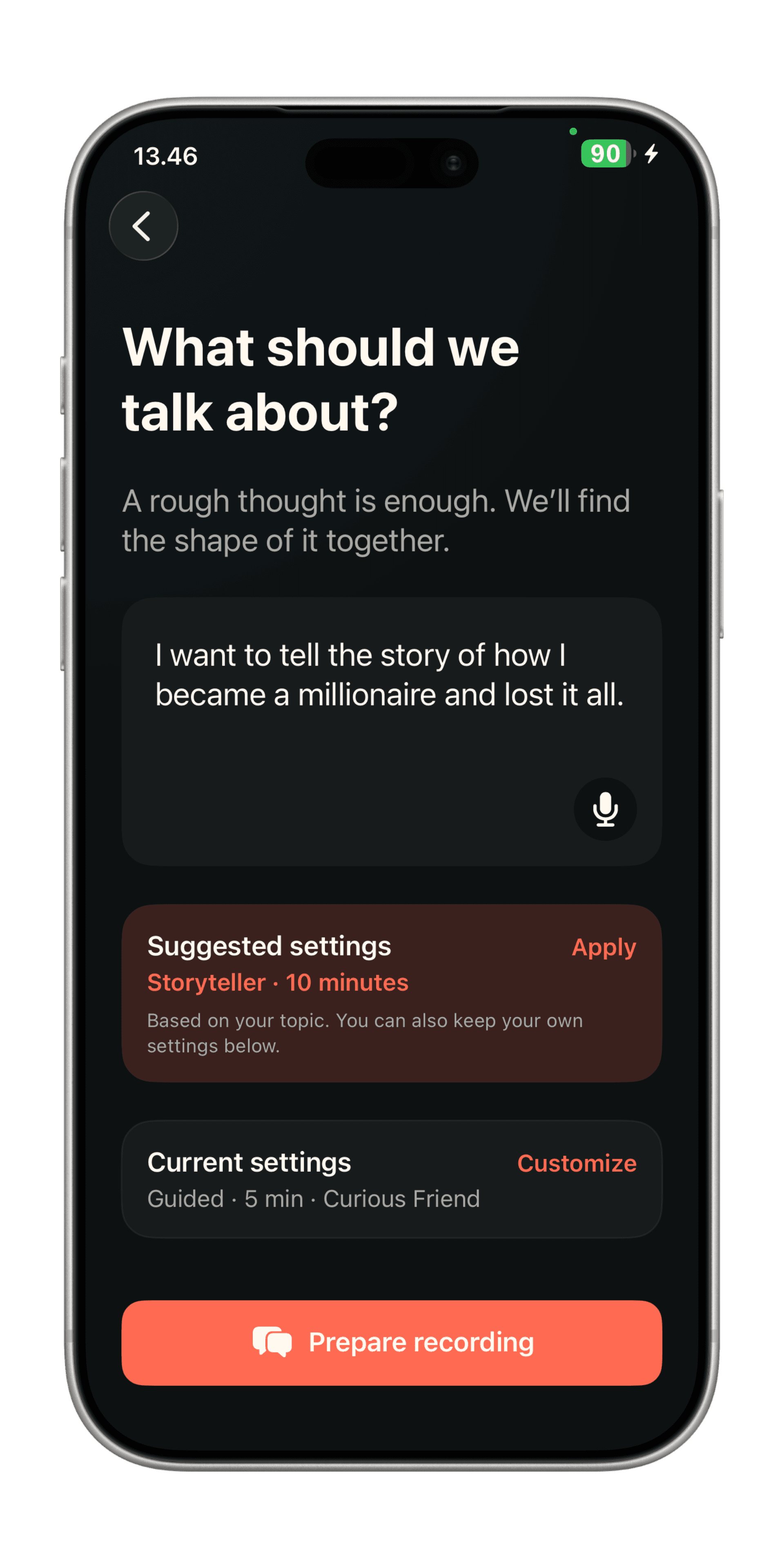
  1. Describe a topic.. Tell Maki what you want to talk about. Then let the app guide you.
  2. Maki guides you or lets you ramble.. Maki gives you cues if you start going off-topic. Questions adapt as you speak.
  3. Get your strongest takes.. Maki identifies the clips worth keeping, and finds the strongest story.
  4. The final cut is yours.. Rearrange, trim and approve your already captioned video.

01 / 04 · Start with a thought.

Describe a topic.

Tell Maki what you want to talk about. Then let the app guide you.

MakiRoll interview screen in a phone frame

Who's this for?

For people who keep meaning to make video.

You know video could help you say the things you want,
but hitting record keeps getting in the way.

Freezing up when the red light comes on

You have an idea of what to say, but you freeze, stumble and start watching yourself the moment you hit record. Maki finally let's you talk.

You sound like a brochure

You tried writing a script, but it sounds nothing like you. Maki gives you something to respond to instead.

Your mind goes blank

You knew exactly what you wanted to say, but the moment you hit record your brain muted itself. Maki keeps you moving with questions that adapt as you talk.

Editing feels like a full-time job

You have better things to do than learning editing software. Instead, simply talk about whatever for 5-15 minutes, and let Maki clean it up for you.

Pricing

First 3 videos are on us.

Try your first three videos for free, then choose a plan based on how often you want to make video.

Prices shown in USD and include VAT where applicable.

Casual

$7.50/ month

$89.99 billed yearly - Save 25%

Make 120 videos / year

Unlimited exports

No watermarks

Great for getting started

Get started

Creator

$14.50/ month

$174.99 billed yearly - Save 27%

Make 250 videos / year

Unlimited exports

No watermarks

Build a recording habit.

Get started

Unlimited

14-day Free Trial

$25.00/ month

$299.99 billed yearly - Save 37%

Make unlimited videos

Unlimited exports

No watermarks

For whenever inspiration strikes.

Get started

No credit card required to try. Cancel anytime.

A recording workflow that slaps.

Maki guides you through recording, helps you build a habit, and auto-edits your videos, without taking full control.

Frequently Asked Questions

How does MakiRoll work?+

Tell Maki what you want to talk about. The camera records while Maki asks adaptive questions. When you finish, MakiRoll finds your strongest self-contained segments, suggests a story, and lets you export the cut you approve.

Do I need an account?+

If you only use the iPhone app - no. If you want to use Maki on multiple platforms - yes. Your subscription is valid across all platforms. Creating an account pairs your subscription.

Do I need a script?+

No. A rough topic is enough. You answer out loud. Maki asks follow-ups. You can stumble, pause, or change your mind — the recording is the interview.

Can I change the suggested video?+

Yes. Maki suggests a main story from the strongest segments, plus sometimes extra takes that can fold into the story. You can reorder, remove, add, preview, and trim start and end times. Nothing exports until you say so.

Where is my video stored?+

The raw interview recording and finished cut stay on your device. MakiRoll saves the approved video to your workspace or camera roll. Raw recordings never touch MakiRoll’s servers. Transcripts does.

Why does MakiRoll need the camera and microphone?+

The camera records the interview. The microphone records your answers so Maki can transcribe them and pick the next question. Finished videos are written to Photos only when you export.

Is there a free trial?+

Yes. MakiRoll gives you three free videos so you can try it out. You can record and shape a video before you subscribe. Exporting free videos come with a watermark.

How much does MakiRoll Pro cost?+

MakiRoll Pro offers multiple plans. One for just getting started. One for creating a video habit. And one for those with a lot on their mind. Plans start from $7.50 / month ($89.99 billed yearly).

Where do I manage or cancel my subscription?+

Subscriptions are managed through your Apple ID. Open Settings on your iPhone, tap your name, then Subscriptions. You can also use Manage subscription in MakiRoll Settings.

Does MakiRoll work offline?+

MakiRoll requires a live internet connection to work as intended.

Where can I use MakiRoll?+

MakiRoll works on web and is available as an iOS app. If you use Android, you can add MakiRoll to the home screen for a similar experience. Sign into the same account to share your subscription; video files stay on the device where you created them.

Download on the App Store

3 videos free