Teleprompters
How to use a teleprompter, step by step
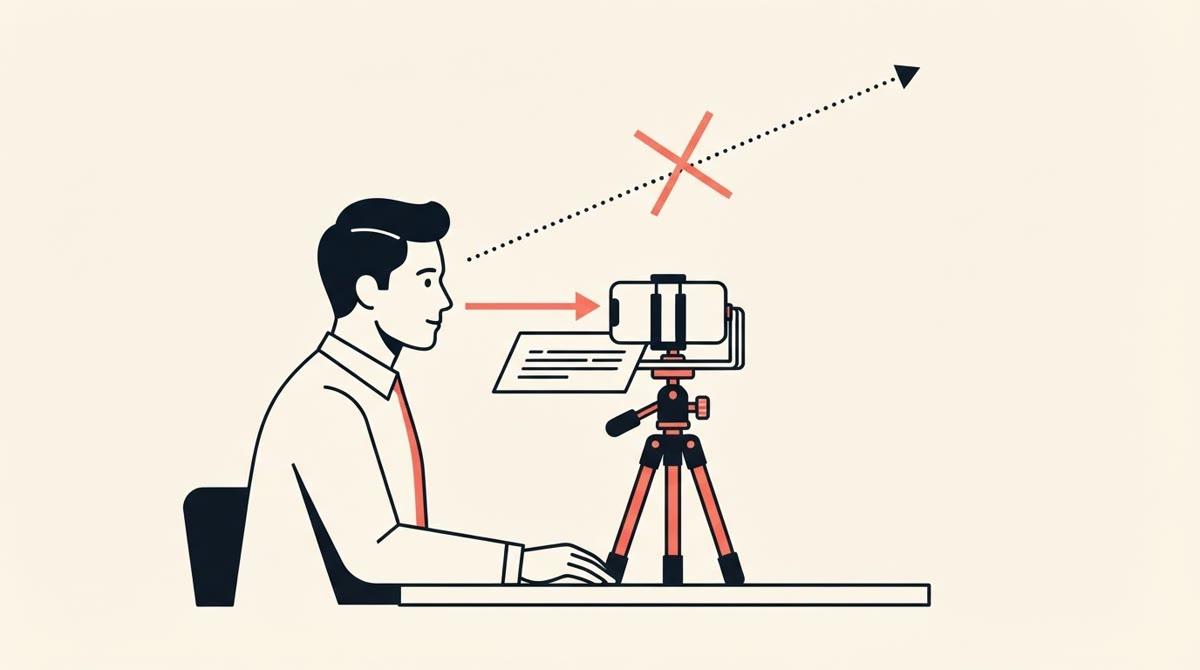
Put the text right next to the lens, keep the lines short, scroll at the pace you actually speak, rehearse once and record in two or three sections. That's the whole method. The steps below add the details and where they come from.
What gives a read away
Three things make a viewer feel they are being read to. Each step below targets one of them.
- Your eyes travel side to side, because the lines are long.
- Your voice goes flat, because you are delivering words in order instead of following a thought.
- Your pace is set by the scroll, so you chase it or wait for it.
One practitioner guide lists the same three: eyes that travel, a flat reading voice and a pace set by the scroll (spolvero.design).
The steps
1. Write for the mouth
A stiff read usually starts with a script written to be read. Use contractions and short sentences. Start a sentence with "and" if that's how you'd say it. Then read it out loud once and rewrite every line you stumble on. One vendor guide puts it simply: "If a sentence sounds stiff when you read it, rewrite it before you record it" (teleprompter.com).
2. Load it and size the text
Paste the script into a prompter app. Make the font large. teleprompter.com suggests 36pt or bigger, and says to go bigger still if you're squinting. Drag the column narrow so each line is a few words.
3. Put the text next to the lens
Distance from the lens is what sells eye contact. teleprompter.com says that even a few inches of offset creates a visible difference. On a laptop the camera sits at the top of the lid, so put the text at the top of the screen, directly under it. With a phone, a tripod behind the camera beats a laptop on the desk.
4. Set the scroll to your voice
Most people speak at 130 to 160 words a minute, according to spolvero.design. Time a paragraph out loud and set the speed to match. teleprompter.com warns that almost every beginner sets it too fast, so if you're guessing, go slower.
5. Rehearse once
Run the full script at recording speed before you hit record. You'll find the lines that trip you, the places to breathe and the stretch where the scroll is wrong. One pass is enough.
6. Record in sections
Two or three sections per video are easier to deliver and easier to redo. The cuts are hard to spot in talking-head video. One approach is to script the opening and the close, then speak the middle from your points with the prompter paused.
7. Watch one take back
Look for the three tells above. If your eyes sweep, narrow the column. If your voice is flat, mark the words you want to stress. If you're chasing, slow down.
| If you notice | Change this |
|---|---|
| Eyes moving side to side | Narrower column, bigger font, text right under the lens |
| A flat voice | Rewrite for speech, mark the words you want to stress |
| Chasing the scroll | Slow it down and rehearse once more |
| Stuck on one sentence | Cut it. If it sounds stiff, it is stiff. |
When to stop optimising
Everything above is a way to hide that you're reading. It works, and it means each video costs a script, a read-through and a setup. If writing the script takes longer than the video, the prompter isn't the part to improve.
Then try answering questions on camera instead. You get the structure without the read. See what to use instead of a teleprompter, or find out which of the four problems you have.
Quick answers
- How do you use a teleprompter?
- Load your script, make the text large with short lines, put the screen as close to the camera lens as you can, set the scroll to your speaking pace (about 130 to 160 words a minute), rehearse once, then record in two or three sections.
- How fast should a teleprompter scroll?
- At the pace you naturally speak, which for most people is 130 to 160 words a minute. If you are guessing, go slower. Almost every beginner sets it too fast and ends up chasing the text.
- Can I use my phone as a teleprompter?
- Yes. A prompter app on a phone or tablet is enough to start. Place the screen as close to the camera lens as you can and keep it steady on a stand.
- How do I stop my eyes moving when I read?
- Narrow the column so each line is short, make the font larger, put the text right under the lens and sit further back. The same line needs less eye movement from further away.
Try it instead of a script
MakiRoll asks you questions while the camera records, finds your strongest takes, and exports the cut you approve. Three videos free, no card.
Start recordingKeep reading
What a teleprompter does to your delivery
A prompter removes memorising and adds reading, and reading is its own skill. What people report, what the setup guides admit, and what nobody has measured.
Do you need a teleprompter? Four problems, one answer each.
A teleprompter fixes one problem: you have a finished script and need to see it. Here's how to tell which of four problems you have, and what to use for the other three.