Teleprompters
What a teleprompter does to your delivery
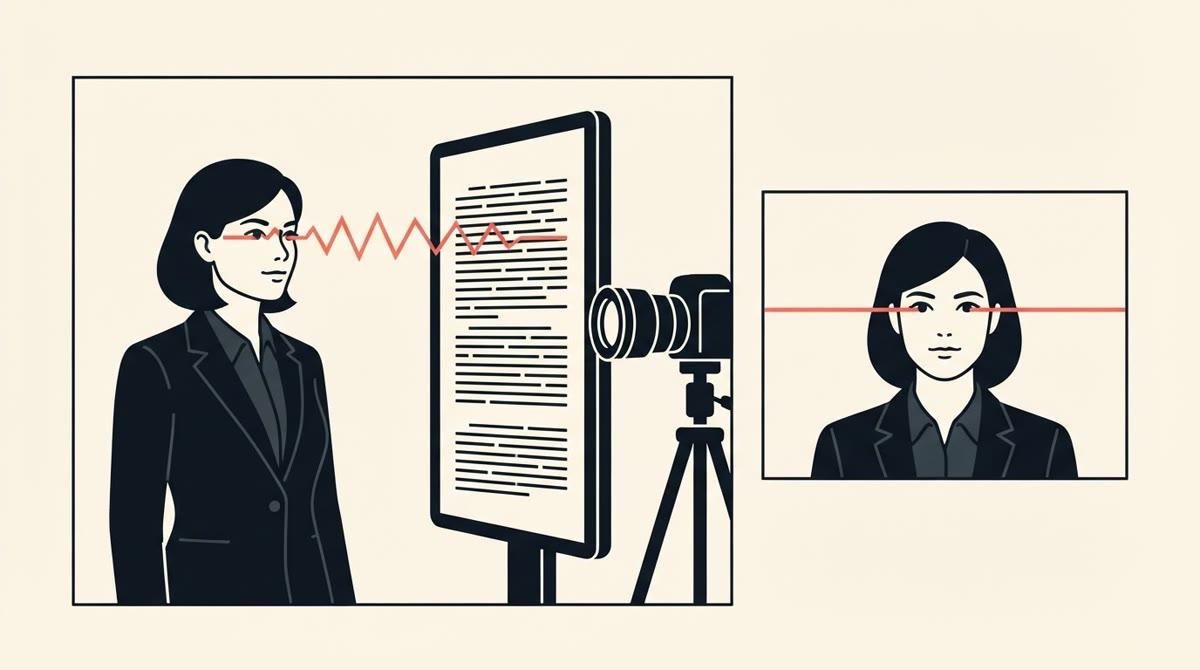
The promise of a teleprompter is simple: stop memorising, keep eye contact, sound prepared. That's mostly true. It also comes with the cost of practising and figuring out how to do it.
What it fixes
- You stop losing your place mid-sentence.
- You stop re-recording because you forgot the third point.
- Your structure survives the camera, which beginners often lose.
Experienced creators say it plainly. In a r/PartneredYoutube thread, one creator writes that they tried a few videos with only an outline and a few bullet points, and that it was "a disaster". They have used a teleprompter for about five years and hundreds of videos since.
What it adds
A second job. You're now reading and performing at once, and the reading tends to win. The visible result is a left-to-right eye sweep, a flatter voice and a pace that belongs to the scroll.
Most prompter guides spend their space on setup for this reason: where to put the text, how big, how fast. It's good advice. It's also all aimed at making the reading less visible.
And let's be fair, most of us don't have the talent of a news anchor to hide it fully.
Beginners feel it quickly. In a r/NewTubers thread, one creator who writes a script and reads it says it saves them editing time, with "far fewer errors and umms/uhhs or weird pauses to edit out". In the next breath they add: "you have to make sure you sound natural and not like you're reading off a teleprompter. I haven't mastered it yet, but I have gotten better."
The other route has costs too
The alternative to a prompter isn't "be naturally good on camera". The person who started the thread mentioned earlier describes working from bullet points: pause after each point, deliver it, then cut it together in editing. They say recording takes longer and the video has more cuts.
| Script and prompter | Bullets or questions | |
|---|---|---|
| You pay up front | Writing and rehearsing the script | Almost nothing |
| You pay on camera | Reading without sounding read | Finding the sentences |
| You pay afterwards | Little editing | More takes and cuts |
Some advice picks a side and calls the other one lazy. The right advice depends on what you're making.
What nobody has measured
We looked for research on teleprompter use and the quality of beginners' videos. We found training material, vendor blogs and classes. But no reviewed studies. We found no controlled evidence on eye contact, how authentic a speaker seems, or how long viewers stay.
So treat the mechanism as well described. But treat any percentage you see quoted as a marketing number. That matters for how much you spend.
A prompter won't make you good on camera, but it removes one point of failure: losing your place. Instead, it asks you for another skill.
What to do with this?
- If you have a finished script you can't memorise, get a prompter and follow the steps.
- If you have an idea but not the words, don't write a script first. Answer questions on camera and keep the best takes. See what to use instead.
- If you're not sure which one you are, answer six questions. It takes a minute.
Quick answers
- Is a teleprompter good for beginners?
- It removes one failure, losing your place, and adds one skill: reading without sounding like you're reading. It helps people who have a finished script. It doesn't help if the real problem is not knowing what to say.
- Is there research on teleprompters and video quality?
- We didn't find any controlled studies on eye contact, perceived authenticity or retention. What exists is practitioner advice, vendor guides and creator threads. We treat the mechanism as well described and the numbers people quote as unmeasured.
Try it instead of a script
MakiRoll asks you questions while the camera records, finds your strongest takes, and exports the cut you approve. Three videos free, no card.
Start recordingKeep reading
How to use a teleprompter, step by step
Put the text next to the lens, keep the lines short, scroll at your speaking pace, rehearse once and record in sections. Seven steps, with the numbers behind them.
Do you need a teleprompter? Four problems, one answer each.
A teleprompter fixes one problem: you have a finished script and need to see it. Here's how to tell which of four problems you have, and what to use for the other three.